1. Home
  2. Learn
  3. Kalshi API setup

Learn · Kalshi API tutorial · about 10 minutes

How to set up the Kalshi API
for automated trading.

Kalshi’s API lets a trading bot or AI agent place and cancel orders on your account, once it has a key that can trade and cash on the exchange your markets trade on. This tutorial gets you set up for automated trading, step by step on Kalshi’s own screens.

Get startedNew to Kalshi? Sign up for a bonus (referral link, opens in new tab)Bot stopped trading? Move your cash to Exchange 2

. Every screenshot is from a real Kalshi account. PM Countdown isn’t affiliated with Kalshi.

Part 1 · in Kalshi, 9 clicks, about 5 minutes

Create your API key.

An API key lets software trade on your Kalshi account without your password. Each step shows the real Kalshi screen and explains the setting on it. Nothing is made until you click Create in step 8. Setting up only for PM Countdown’s agents? You can wait: that connection isn’t open yet, as part 4 explains.

  1. Go to kalshi.com and log in

    Open kalshi.com (opens in new tab) on a computer and log in to your own account. A computer is easier than a phone for this. No account yet? Sign up through our referral link (opens in new tab) (Referral link: Kalshi’s offer, as of Oct 17, 2026, is a bonus up to $25 once you start trading), then come back to step 2.

    Kalshi’s top bar on kalshi.com, where you log in to start making an API key, with the Kalshi logo at the left
    Captured Oct 16, 2026 on our own Kalshi account. Kalshi’s top bar, with the logo at the left.
  2. Click the menu, top right

    Look at the top right corner, past your cash and the bell. Click the three short lines (☰). A menu opens.

    The right end of Kalshi’s top bar, with the three-line menu button ringed
    Captured Oct 16, 2026 on our own Kalshi account. The right end of the top bar, with the three-line menu ringed. Our cash and portfolio amounts are covered.
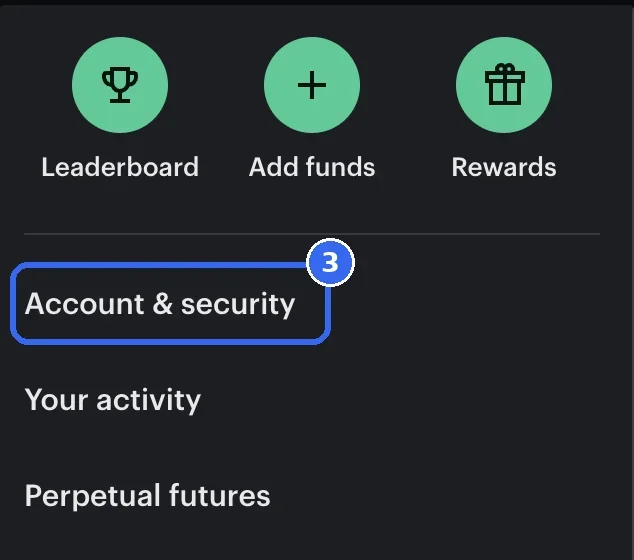
  3. Click Account & security

    In the menu, click Account & security. Skip API Docs further down: that is Kalshi’s documentation for programmers.
    Shortcut: kalshi.com/account/profile opens the same page.

    Kalshi’s menu, with Account and security ringed
    Captured Oct 16, 2026 on our own Kalshi account. The open menu, with Account & security ringed in its second block.
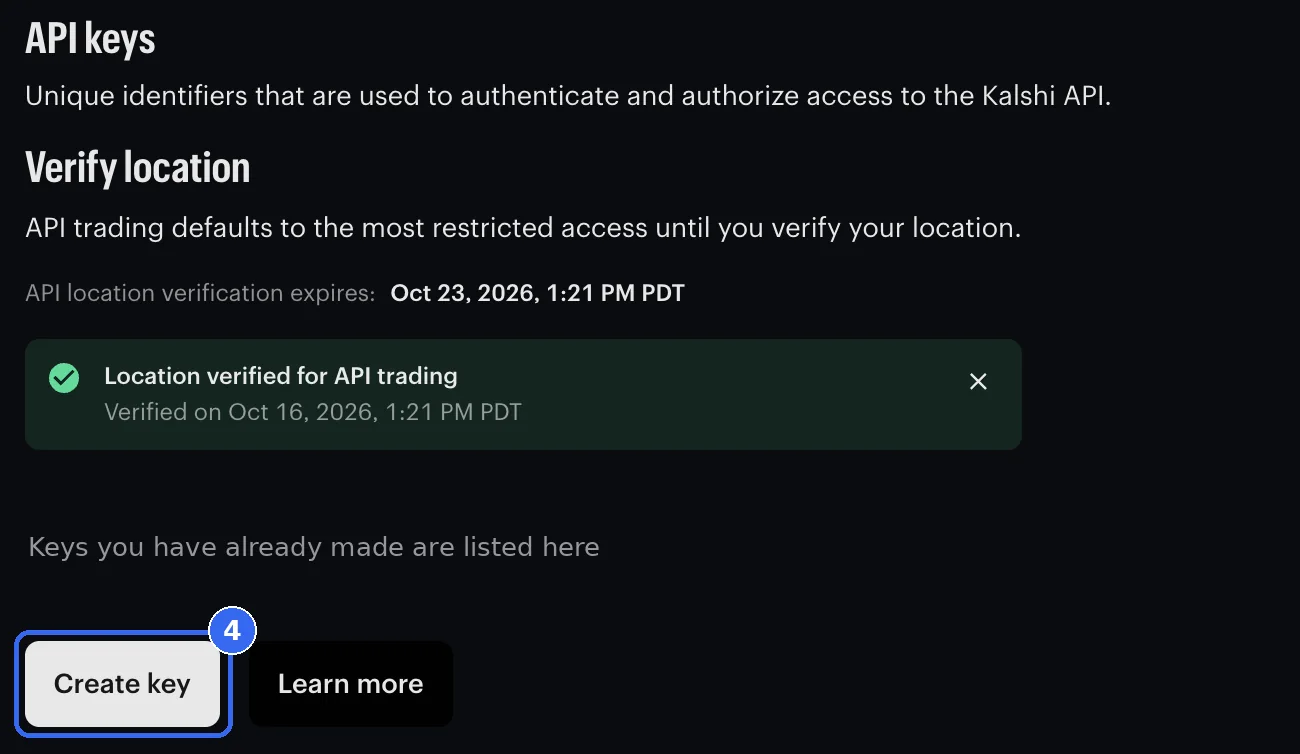
  4. Scroll down to API keys and click Create key

    Scroll down the page to the API keys box and click Create key. Keys you already have are listed just above the button. The Verify location box on the same page matters too; it is explained below these steps.

    The API keys box on Account and security, with Verify location above and the Create key button ringed
    Captured Oct 16, 2026 on our own Kalshi account. The API keys box, with Create key ringed. Our existing keys are covered.
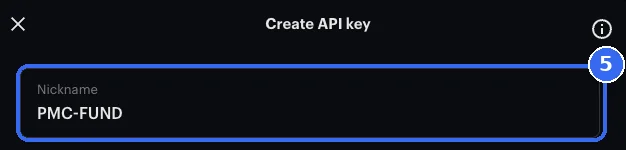
  5. Give the key a nickname

    A window called Create API key opens. In the Nickname box, type any name you’ll recognize later. This guide uses PMC-FUND as the example. The nickname is only a label and doesn’t change what the key can do.

    The top of the Create API key window, with PMC-FUND typed in the Nickname box
    Captured Oct 16, 2026 on our own Kalshi account. The Create API key window, with the example name PMC-FUND in the Nickname box.
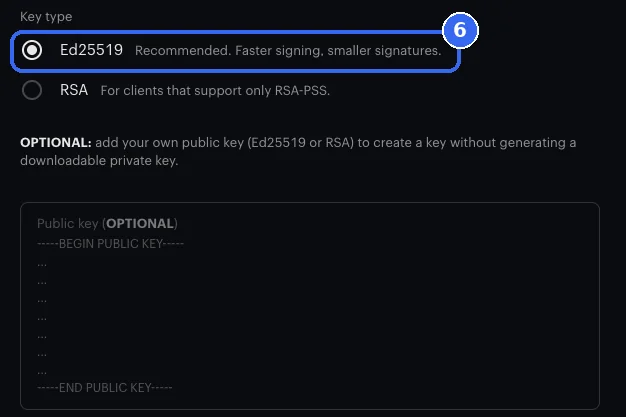
  6. Check the key type, and leave the public key box empty

    Ed25519 is already picked and marked Recommended. Keep it unless your software only works with RSA; then pick RSA instead. Leave the Public key (OPTIONAL) box empty too: it is for people who bring a key of their own.

    Key type, with Ed25519 picked and ringed, above the empty optional public key box
    Captured Oct 16, 2026 on our own Kalshi account. Key type with Ed25519 picked, and the optional public key box empty below it.
  7. Keep Full access, or pick Trade only

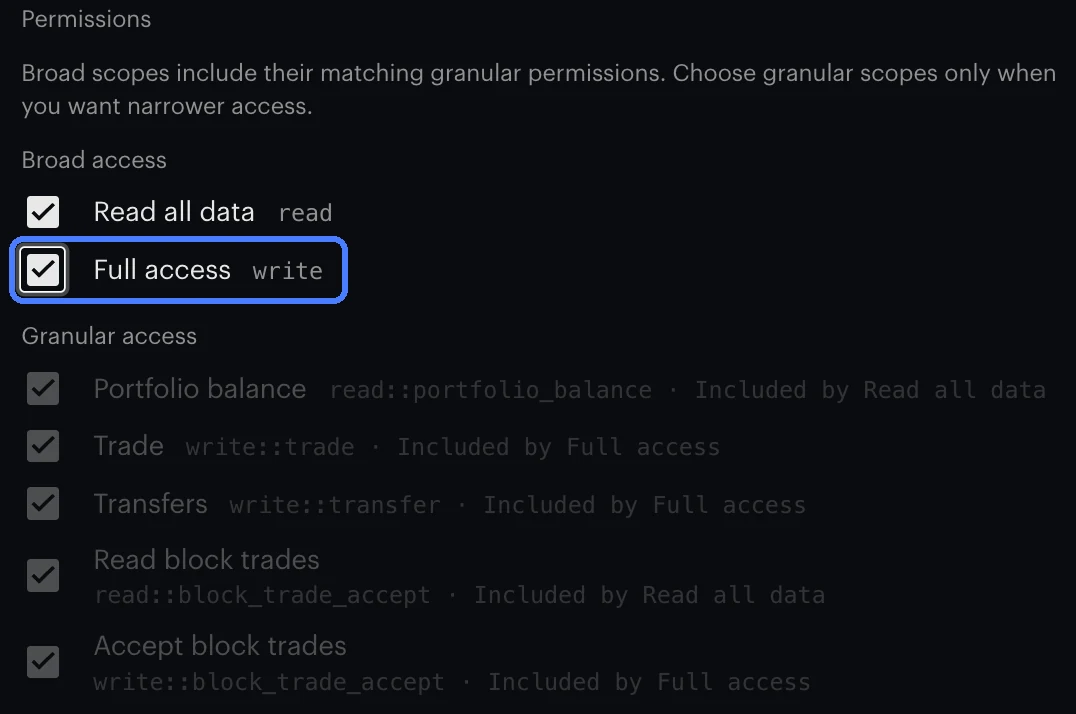
    Kalshi ticks Read all data and Full access for you. Choose one of the two setups below. Kalshi’s API documents moving cash inside your own account, between your exchanges, and we found no API call that withdraws to a bank (checked Oct 17, 2026).

    Recommended

    Full access

    Leave Read all data and Full access ticked. Trade, Transfers and Accept block trades turn on with it, so software can move cash between your Kalshi exchanges and keep Exchange 2 funded, if it is built to.

    Kalshi’s permission checkboxes with Read all data and Full access ticked, and Trade, Transfers and Accept block trades marked Included by Full access

    Option

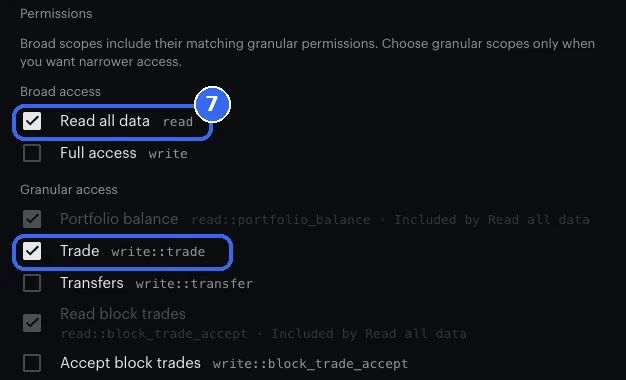
    Trade only

    Untick Full access, then tick Trade. Leave Transfers and Accept block trades empty. This key can trade but can’t move cash between exchanges, so keep cash on Exchange 2 yourself, or its orders come back “insufficient balance”. How to move cash to Exchange 2

    The Trade only option on Kalshi’s permission checkboxes: Read all data and Trade ticked and ringed, Full access and Transfers empty
    Captured Oct 17, 2026 (Full access) and Oct 16, 2026 (Trade only) on our own Kalshi account.
  8. Click Create

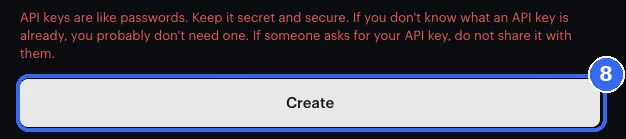
    Check the boxes once more: Full access ticked, or Read all data and Trade if you chose Trade only. Then click Create at the bottom of the window.

    The bottom of Kalshi’s Create API key window: a red warning about keeping keys secret, above the ringed Create button
    Captured Oct 16, 2026 on our own Kalshi account. Kalshi’s red warning about keeping keys secret, right above the Create button.
  9. Copy the key id, keep the file, click I’ve saved my key

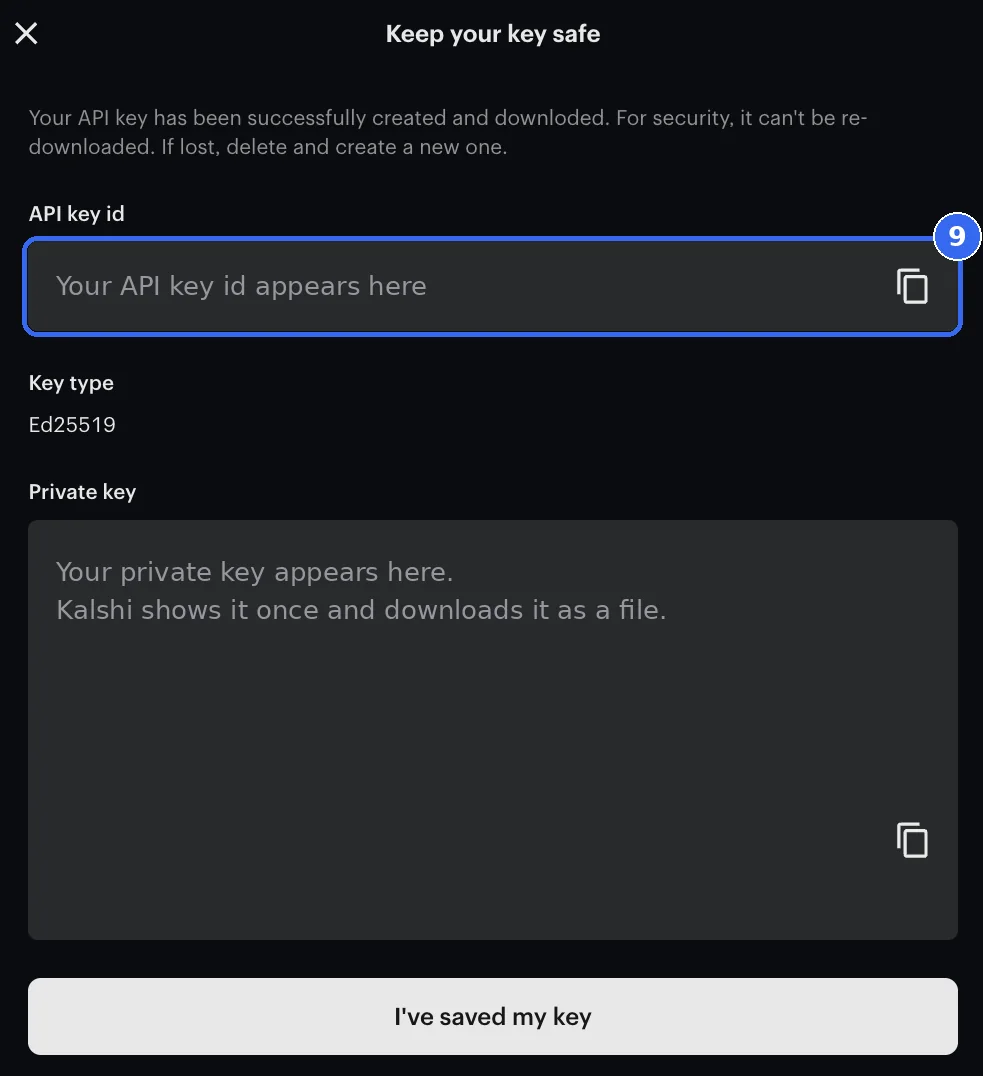
    A window called Keep your key safe shows two things. The API key id: click the copy icon beside it and paste it somewhere only you can open, like a password manager. The Private key: Kalshi has already downloaded it as a file. Keep that file the same way. Kalshi shows it once; if you lose it, delete the key and make a new one. Then click I’ve saved my key.

    Kalshi’s Keep your key safe window, with the key id box ringed and both values replaced by placeholder text
    Captured Oct 16, 2026 on our own Kalshi account. The Keep your key safe window, with the key id box ringed. Both values are replaced with placeholder text. Never show yours to anyone.

0 of 9 doneYour place is saved in this browser, nowhere else.

Kalshi gave me a Key ID and a private key. Is that two keys?

No. One key, two halves. At the end Kalshi hands you a Key ID and a private key. People see two things and think two keys. They are the two halves of the one key these nine steps make.

The only time you want a second one is to practise with pretend money first. Kalshi runs a separate practice site at demo.kalshi.co (opens in new tab). It is a different account, and Kalshi says credentials “are not shared between this environment and production”, so a practice key is its own key, made with the same nine steps. Practise there, then come back and do it for real.

Part 2 · keep it safe

Keep your Kalshi API key safe.
The Key ID handy, the private key secret.

  • The Key ID tells Kalshi which key is asking, like a username. It isn’t secret on its own, so a note is fine, and any software that uses the key needs it too.
  • The private key file is like your password. Anyone who has it can trade your account. Keep it where only you can open it, such as a password manager. If you run your own trading software, store it in that software’s protected secret settings, never in shared code, a public code repository or a log. Never send it in a text, a chat, a DM or an email.
  • Made a mistake, or think someone saw the file? Go back to Account & security, find your key (PMC-FUND, if you used the example name) in the API keys list and delete it with the button beside it. From then on the key can’t be used, and Kalshi says a deleted key can’t be brought back. Deleting it doesn’t undo trades it already made, so check your open orders in Kalshi and cancel any you don’t want. Then make a new key from step 4.
Diagram, not a Kalshi screen. Your key in the API keys list, with the delete button beside it. Deleting it switches that key off; it doesn’t undo trades it already made.

Part 3 · move your funds

Move cash between Kalshi exchanges
for sports, crypto and combos

Kalshi keeps a separate balance on every exchange. One settings page shows all four, and one switch on it decides whether Kalshi moves money between them for you. It is not in the top menu, so here is the way in. Where this part says your agents, it means any software that trades your account through Kalshi’s API.

Your agents have no cash

Every Ultra Pro agent trades 15 minute crypto and metals contracts, all of them on exchange 2, Crypto and Commodities. If its balance is $0.00, their automated orders come back “insufficient balance” however much the account holds elsewhere. Trades you place by hand can pull it away; turning on Disable balance management stops that. Move it back to exchange 2.

Exchange 3Tennis, baseball and basketballExchange 2Crypto and CommoditiesMove cash from exchange 3 to exchange 2.

Trade sports with your agents’ winnings

Their profit lands on exchange 2. In the app or on kalshi.com, just place the trade: with Disable balance management off, Kalshi pulls the cash across for you. Through the API, it has to be on the market’s exchange first: 0 for football, hockey, UFC and college football, 3 for baseball, basketball and tennis, 1 for combos.

Exchange 2Crypto and CommoditiesExchange 0Everything elseMove cash from exchange 2 to exchange 0.

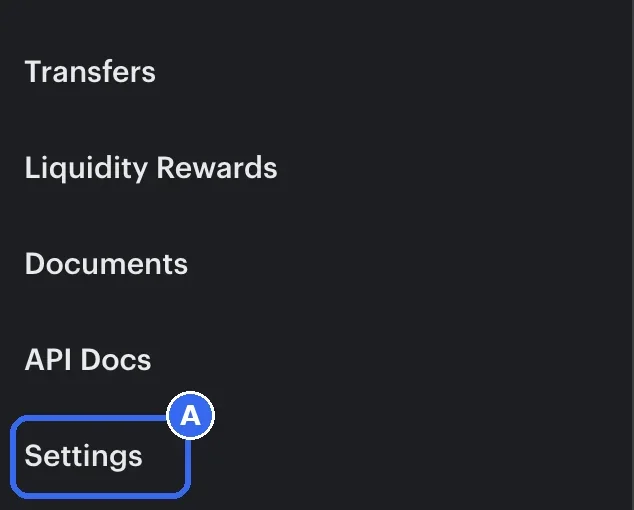
  1. Open Advance shard settings

    Click the three-line menu (☰) at the top right, then Settings. Or go straight to kalshi.com/account/exchange-indexes. The page is called Advance shard settings.

    Kalshi’s three-line menu with Settings ringed, the way into Advance shard settings
    Captured Oct 16, 2026 on our own Kalshi account. The three-line menu, with Settings ringed near the bottom.
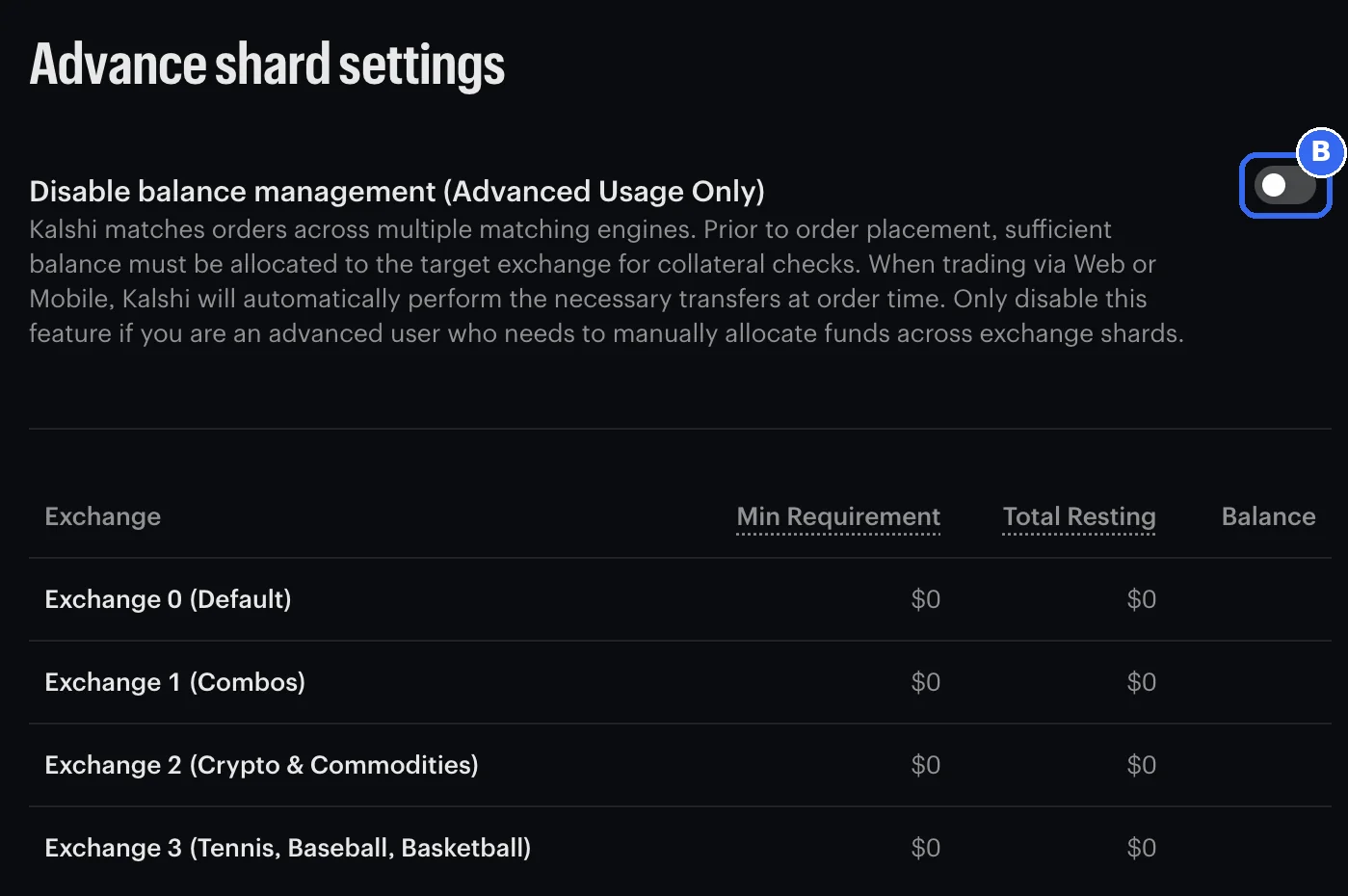
  2. Turn on Disable balance management

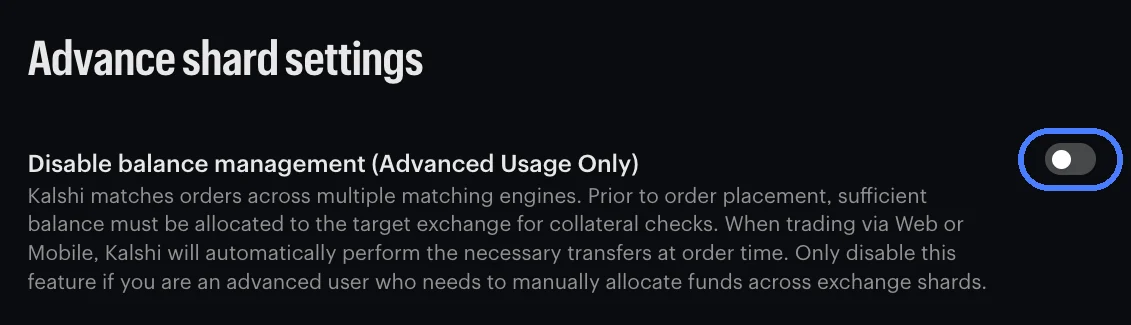
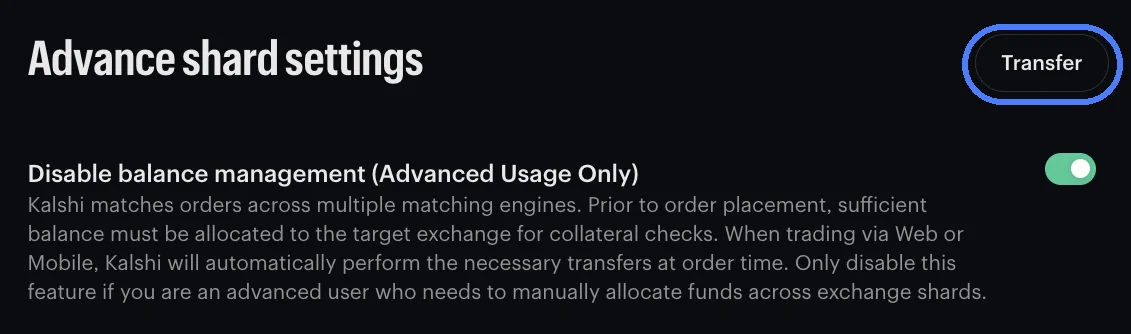
    At the top is a switch called Disable balance management (Advanced Usage Only). Off is Kalshi’s default, and with it off this page has no Transfer button. To move cash yourself, turn it on. Transfer appears at the top right.

    Advance shard settings, with the Disable balance management switch ringed, switched off
    Captured Oct 16, 2026 on our own Kalshi account. Advance shard settings with the Disable balance management switch ringed. It is off, Kalshi’s default, so there is no Transfer button yet. Our balances are covered.
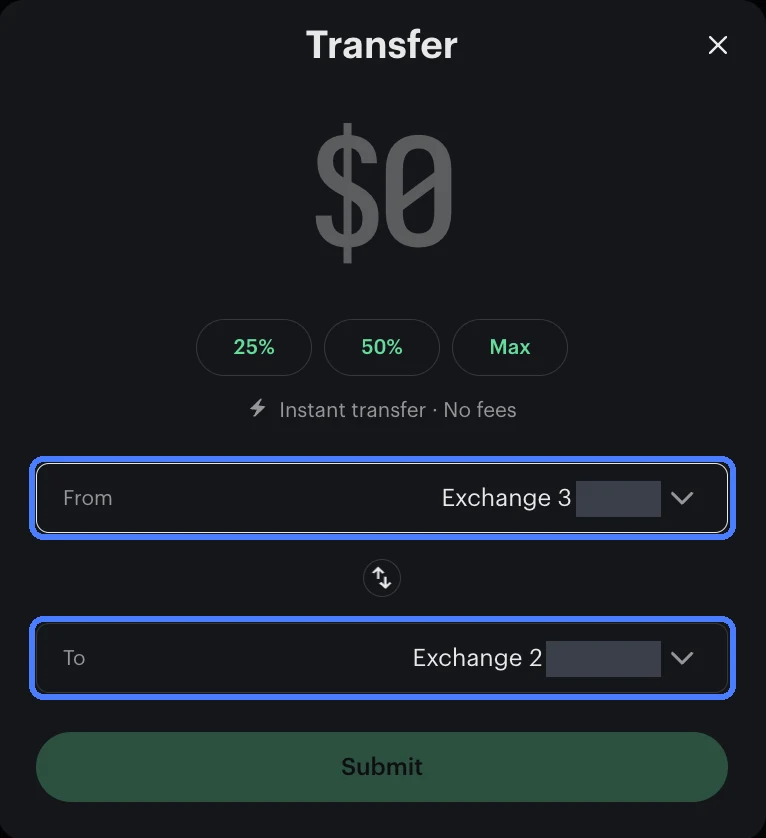
  3. Click Transfer, then move cash to Exchange 2

    Click Transfer. From: the exchange your cash is on, usually 1 or 3. To: Exchange 2 for your agents, or the exchange of the sports market you want to trade through the API. Type an amount or tap 25%, 50% or Max, then Submit. Kalshi marks it “Instant transfer · No fees”.

    Kalshi’s Transfer window moving cash from Exchange 3 to Exchange 2, with the From and To pickers ringed and balances covered
    Captured Oct 16, 2026 on our own Kalshi account. The Transfer window: From Exchange 3, To Exchange 2, both ringed. Balances covered.
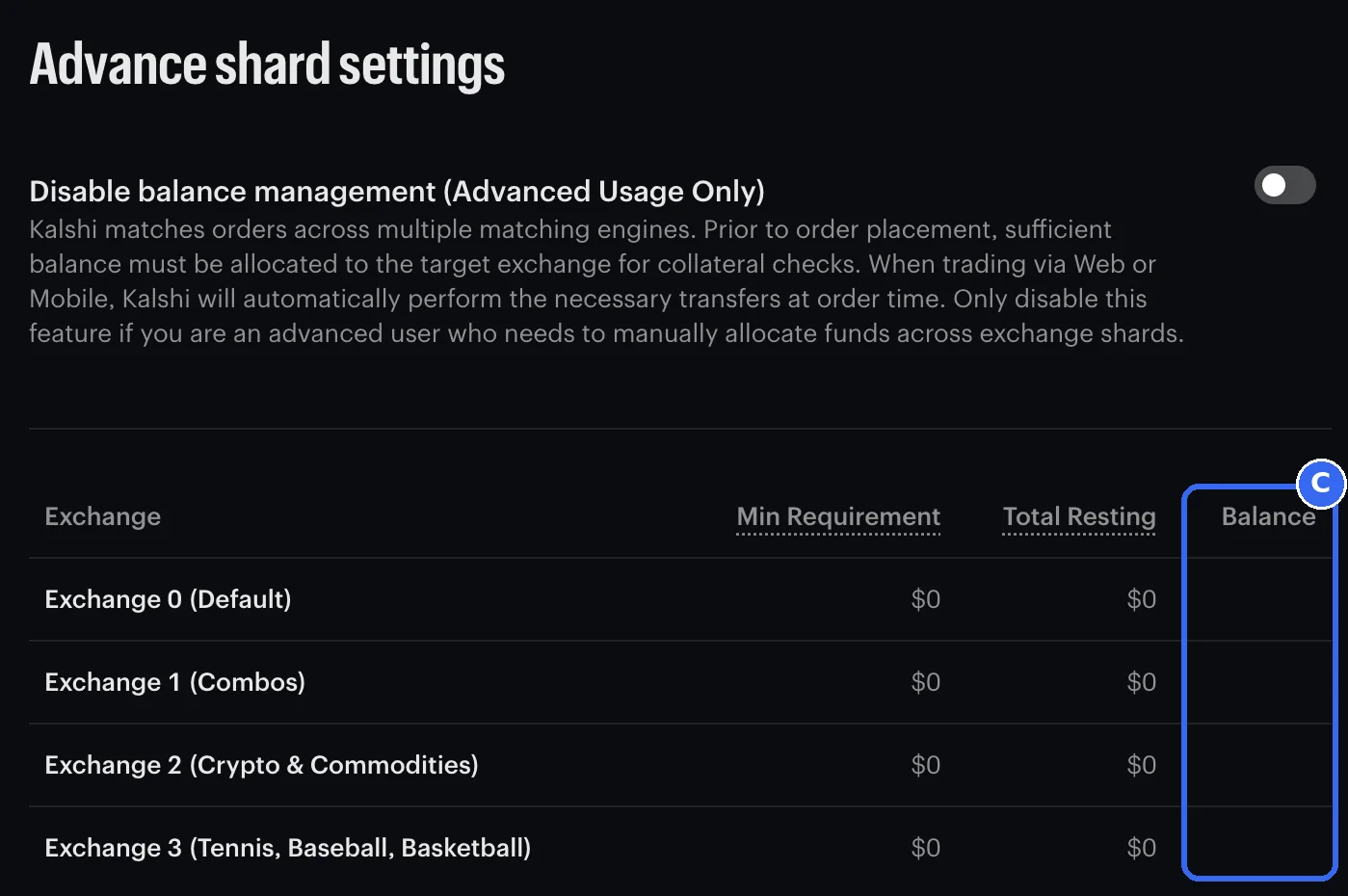
  4. Check the Balance column

    The table lists Exchange 0 to 3 and the cash on each. Your agents need theirs on Exchange 2 (Crypto & Commodities). A sports order placed through the API needs it on 0, 1 or 3. Then decide whether to leave the switch on or turn it back off: what each setting does.

    Kalshi’s Advance shard settings table of exchanges 0 to 3, with the Balance column ringed and our balances covered
    Captured Oct 16, 2026 on our own Kalshi account. The Balance column for exchanges 0 to 3, ringed. Our balances are covered; yours show here.

Keep reading below for why Kalshi splits your cash like this, and how to keep cash on exchange 2.

  1. Exchange 0Everything elseFootball, hockey, UFC, college football and every category without its own exchange
  2. Exchange 1CombosCombos and parlays across categories
  3. Exchange 2Crypto and CommoditiesBitcoin, Ethereum, Solana, XRP, gold, silver and copper, the 15 minute markets includedYour agents trade here
  4. Exchange 3Tennis, baseball and basketballMLB, NBA, WNBA and tennisCash sitting here

Exchange 3Tennis, baseball and basketballExchange 2Crypto and CommoditiesMove cash from exchange 3 to exchange 2.

Diagram, not a Kalshi screen. Cash moves from the exchange it sits on to exchange 2. Kalshi’s own screens may look different.

What do you want to trade next?

Tap one and this says which exchange its cash has to be on. Checked against Kalshi’s live markets on Oct 16, 2026.

Football, hockey, UFC and college football are exchange 0. Baseball, basketball and tennis are exchange 3. Crypto and metals, where your agents trade, are exchange 2. Combos across categories are exchange 1.

Where Kalshi’s markets trade, checked Oct 16, 2026
ExchangeWhat trades thereSeries we read
0Everything else
Football, hockey, UFC, college football and every category without its own exchange
KXNFLGAME, KXNHLGAME, KXUFCFIGHT, KXNCAAFGAME
1Combos
Combos and parlays across categories
KXMVECROSSCATEGORY
2Crypto and Commodities
Bitcoin, Ethereum, Solana, XRP, gold, silver and copper, the 15 minute markets included
KXBTC15M, KXETH15M, KXSOL15M, KXXRP15M, KXGOLD15M, KXSILVER15M, KXCOPPER15M
3Tennis, baseball and basketball
MLB, NBA, WNBA and tennis
KXMLBGAME, KXNBAGAME, KXWNBAGAME

Background · what changed at Kalshi

One Kalshi account,
four separate exchange balances

Kalshi used to run every market on one exchange with one cash balance. To handle more trading it now splits markets across several matching engines, which it calls exchanges, and each one checks your cash on its own.

  • Aug 24, 2026 Kalshi announced crypto, tennis and baseball would get their own exchanges
  • Sep 10, 2026, 9:00 AM PT new commodities markets started on exchange 2 and new basketball markets on exchange 3
  1. Exchange 0Everything elseFootball, hockey, UFC, college football and every category without its own exchange
  2. Exchange 1CombosCombos and parlays across categories
  3. Exchange 2Crypto and CommoditiesBitcoin, Ethereum, Solana, XRP, gold, silver and copper, the 15 minute markets includedYour agents trade here
  4. Exchange 3Tennis, baseball and basketballMLB, NBA, WNBA and tennis
Diagram, not a Kalshi screen. The four exchanges as Kalshi numbers them. Sports is not one balance: football and hockey sit on exchange 0, and tennis, baseball and basketball on exchange 3.

Kalshi says it will add exchanges over time, so this table carries the date we checked it. Exchange 2 holds the crypto and commodities 15 minute markets.

Why API orders fail with insufficient balance

The app moves your cash.
Automated orders don’t.

When you trade in the Kalshi app or on kalshi.com, Kalshi moves cash to the right exchange for that order. When software places the order through Kalshi’s API, it doesn’t. Kalshi’s own docs say “Programmatic traders normally need to fund the relevant exchange shard before placing an order.” If the cash sits somewhere else, the order is turned away.

Keep your agents funded

How to keep cash
on exchange 2

  • Trading by hand. When you place a sports or other trade in the app, Kalshi can pull cash from exchange 2 for it. Look at the Crypto and Commodities balance before your agents start, or turn on Disable balance management to stop it.
  • Automatic rebalancing. Kalshi can hold a target split across exchanges and checks it every 10 seconds. Kalshi’s docs say it’s set through its API or its clearing portal, so most people move cash by hand.
  • How much to put there. Only what you can afford to lose. Whatever sits on exchange 2 is all that crypto and metals orders placed through the API can use, unless you set up automatic rebalancing. How to size a bankroll.

Our AI agents and their markets, all on exchange 2. Each has its own page in The Lab:

What’s next

PM Countdown’s managed connection waits on
Kalshi’s written approval

With a key and cash on the right exchange, your side is ready. The last piece is the connection itself, and it isn’t open. PM Countdown’s managed connection, where our servers would place trades for you, needs Kalshi’s written approval first, and we can’t say when, or whether, that will come. Until then Ultra Pro checkout stays closed, and nothing on this page links your account to us. You don’t need a key for it yet.

We will never ask for your Kalshi password, and never for your private key by email, text, chat or DM. If anyone does in our name, it isn’t us.

What you can do today

  • Watch the agents first. Each agent’s calls and results are on its own page in The Lab. Judge them there before you pay for anything.
  • Get free trades. PM Countdown’s trade plans by email, free. If the connection opens, we’ll say so there.
  • Made a key only for this? You can leave it unused, or delete it on Account & security and make a fresh one when you need it. It takes about five minutes.

Free trades come by email from PM Countdown. They aren’t a Kalshi offer or Kalshi credit, and you can unsubscribe from any email. About Ultra Pro

Kalshi API setup questions

Can I use the Kalshi API for automated trading?

Yes, on your own account. Kalshi’s API lets software, from a simple trading bot to an AI agent, read markets and place and cancel orders with an API key you make under Account & security on kalshi.com. Kalshi’s developer agreement limits the API to a member’s own trading. One catch: an automated order normally spends only the cash already on its market’s exchange.

What permissions does a Kalshi trading bot need?

Full access, which Kalshi ticks for you, or Read all data and Trade if you want less. Full access includes Transfers, so software can move cash between your own Kalshi exchanges and keep Exchange 2 funded by itself, if it is built to. A Trade only key can’t move cash between exchanges, so keep cash on Exchange 2 yourself or its orders come back insufficient balance.

Does Kalshi API trading need location verification?

Yes. On Account & security, just above API keys, Kalshi says API trading defaults to the most restricted access until you verify your location. On our account the verification lasted one week, so note its expiry date and verify again before it runs out.

How does Kalshi API authentication work?

With a signature, not a password. Every request your software makes carries three things: the Key ID, the time in milliseconds, and a signature made by signing the time, method and path with the private key. Kalshi checks the signature before it acts on the request. Kalshi doesn’t keep a copy of the private key, so it can’t be recovered, only replaced.

Does Kalshi have a demo environment for testing API trading?

Yes. Kalshi runs a practice site at demo.kalshi.co that uses mock funds. It is a separate account, and Kalshi says credentials are not shared between it and the real site, so a practice key is its own key, made the same way.

Does the Kalshi API offer a WebSocket?

Yes. Besides one-off REST requests, Kalshi offers a WebSocket API, which keeps a connection open so updates arrive as they happen, and a FIX API. Kalshi’s docs say WebSocket connections use the same API key authentication as the rest of the API.

Does the Kalshi API have rate limits?

Yes. Kalshi meters requests per second by access tier. Basic, the tier an account gets when it signs up, allows 200 read and 100 write tokens per second as of Oct 17, 2026, and an order costs 10 tokens by default. Requests over the limit come back with error 429. Kalshi’s docs list the higher tiers and how to reach them.

Should I pick Ed25519 or RSA for a Kalshi API key?

Pick the type your software supports. Kalshi picks Ed25519 by default and marks it Recommended. RSA is for software that only signs with RSA, such as Kalshi’s own SDKs before version 3.31.0. Kalshi says the request headers, permissions and errors are the same for both.

Does Kalshi have official API SDKs?

Yes. Kalshi publishes official Python and TypeScript SDKs, and notes they may lag the API. Ed25519 keys need SDK version 3.31.0 or later; older versions sign only with RSA.

Can an AI agent trade my Kalshi account for me?

Yes, when it is software you run on your own account with your own API key. A service that trades for you from its own servers is a different arrangement under Kalshi’s developer agreement. PM Countdown’s managed connection is not open: it needs Kalshi’s written approval first.

Why does Kalshi show my cash on different exchanges?

Kalshi split trading across several matching engines to handle more volume, and it keeps a separate cash balance on each one. There are four today: 0 for most markets, 1 for combos, 2 for crypto and commodities, and 3 for tennis, baseball and basketball.

Which exchange do the Ultra Pro agents trade on?

Exchange 2, which Kalshi names Crypto and Commodities. Every Ultra Pro agent trades 15 minute crypto or metals contracts, and each of those series we checked on Oct 16, 2026 was on exchange 2. If your agents stop trading, check that exchange 2 has cash first.

Do I need to move cash if I only trade in the Kalshi app?

No, as long as Disable balance management is off, which is how Kalshi ships it. Orders you place in the Kalshi app or on kalshi.com then move cash between exchanges as needed. Only orders placed by software through Kalshi’s API need the cash to be on the right exchange already.

Why did an automated order say insufficient balance when my account has cash?

The cash is on a different exchange from the market. An API order only spends the cash on its own market’s exchange, and for crypto and metals contracts that is exchange 2. To fix it, open Advance shard settings, turn on Disable balance management, click Transfer, and move cash from the exchange it sits on to exchange 2. The fix, step by step.

Where do I move cash between Kalshi exchanges?

On Kalshi’s Advance shard settings page, at kalshi.com/account/exchange-indexes, under Settings in the three-line menu at the top right. It lists exchanges 0 to 3 with the cash on each. Turn on the Disable balance management switch and a Transfer button appears at the top right: pick From and To, enter an amount and Submit. Kalshi marks it as instant with no fees. With the switch off, trades you place in the app or on kalshi.com move cash for you, but automated orders do not. The fix, step by step.

Is there a Kalshi sign-up bonus or promo code?

Yes, for new accounts. As of Oct 17, 2026, Kalshi’s offer through a referral link like ours is a bonus up to $25 once you sign up and start trading, and your exact terms show in your Kalshi account under Rewards. The bonus is for the account, not for API trading itself. If you sign up through our referral link, Kalshi may pay us a referral bonus too. It doesn’t change your offer.

How do I deposit money on Kalshi?

On kalshi.com, click Funds on your Portfolio page and open the Deposit tab. It offers Apple Pay, Google Pay, card, your bank, Venmo, PayPal, crypto and wire, with a $10 minimum. Connecting your bank and Venmo show no fee; Apple Pay, Google Pay, card and PayPal show a 2% fee. As of Oct 17, 2026, some users have deposited with credit cards from banks like Citi, U.S. Bank and Bank of America. For automated trading, then move the cash to the exchange your markets trade on.

Do I need one API key or two?

One. A Kalshi key arrives in two halves, a Key ID and a private key, and both belong to the same key. You need a second key only if you also want to practise with pretend money on Kalshi’s demo site at demo.kalshi.co, which is a separate account whose credentials, in Kalshi’s words, are not shared with the real site.

Can a Kalshi API key take money out of my account?

Kalshi’s API documents moving cash within your own account, between your exchanges, and we found no API call that withdraws to a bank (checked Oct 17, 2026). A Full access key can trade and move cash between your exchanges. A Trade only key can trade but can’t move cash between exchanges. Anyone holding either one could still place trades with your cash, so keep it where only you can open it, and delete it in Kalshi if you think someone saw it.

Where should I keep my Kalshi private key?

Keep the file Kalshi downloaded somewhere only you can open, like a password manager. If you run your own trading software, it needs the key too: store it in that software’s protected secret settings, never in shared code, a public code repository or a log. Never send it in a text, a chat, a DM or an email.

Will PM Countdown ask for my Kalshi password?

No. We never ask for your Kalshi password, and never for your private key by email, text, chat or DM. If anyone does in our name, it isn’t us. PM Countdown’s managed connection is not open. It needs Kalshi’s written approval first, and this page will explain how it works before anyone can use it.


Sources

Checked Oct 16, 2026. PM Countdown isn’t affiliated with Kalshi. Kalshi is 18+.

Bot stopped trading?

Your cash is on the wrong exchange.
Move it to Exchange 2.

When you trade sports or combos by hand, Kalshi moves cash onto those exchanges for you: Exchange 3 for tennis, baseball and basketball, Exchange 1 for combos. Orders placed through the API don’t get that help at order time. Its orders only spend what already sits on Exchange 2 (Crypto & Commodities), so with your cash parked on 1 or 3 they come back “insufficient balance” and your bot sits idle, even with the Disable balance management switch left off, Kalshi’s default. It happened to our own account on Oct 15 and again on Oct 16, 2026. A Trade only key can’t move the cash itself, so this matters most if you picked Trade only in step 7. Here is the fix.

Open Advance shard settings on kalshi.com (opens in new tab)

  1. Turn on Disable balance management. With it off, Kalshi’s default, the page has no Transfer button at all. Turning it on is what reveals it.

    Kalshi’s Advance shard settings page with the Disable balance management switch off and ringed, and no Transfer button
    Captured Oct 16, 2026 on our own Kalshi account. Switch off, ringed: no Transfer button anywhere on the page.
  2. Click Transfer, which now shows at the top right.

    Kalshi’s Advance shard settings page with the switch on and the Transfer button at the top right ringed
    Captured Oct 16, 2026 on our own Kalshi account. Switch on: Transfer, ringed, appears at the top right.
  3. From: the exchange your cash is on, usually Exchange 1 or Exchange 3. To: Exchange 2. Type an amount or tap 25%, 50% or Max, then Submit. Kalshi says the move is instant and free. Whatever you put on Exchange 2 is all your agents can trade with.

    Kalshi’s Transfer window moving cash from Exchange 3 to Exchange 2, with the From and To pickers ringed and balances covered
    Captured Oct 16, 2026 on our own Kalshi account. From Exchange 3, To Exchange 2, both ringed. Balances covered.
  4. Check the Balance column. Your cash should now sit on the Exchange 2 row, and your bot can trade again on its next try.

    Kalshi’s table of Exchanges 0 to 3 with the Exchange 2 Crypto and Commodities row ringed and every balance covered
    Captured Oct 16, 2026 on our own Kalshi account. Our balances are covered; yours show in the right-hand column.
  5. Then choose where to leave the switch. Off: your own app trades move cash for themselves again, and can pull it back off Exchange 2, so look at this page after you trade sports or combos. On: each exchange keeps its own cash and your agents’ stays put, but you move money for sports yourself with Transfer. We moved ours, then turned the switch back off.

How we know

What we tested,
and what we didn’t

Where each part of this guide comes from, as of Oct 17, 2026
What the guide saysWhere it comes from, and when
Done on our own Kalshi account
The way to Create key: the three-line menu, then Account & securityClicked through and captured, screen by screen, Oct 16, 2026
The new key window: Ed25519 picked and marked Recommended, Full access ticked until you change itCaptured on our own account, Oct 16, 2026
Kalshi shows the private key once and downloads it as a fileSeen on our own account, Oct 16, 2026. Kalshi’s API Keys doc agrees.
Disable balance management is off by default, and Transfer shows only when it is onCaptured on our own account, Oct 16, 2026
Moving cash between exchanges is marked instant with no feesKalshi’s Transfer window on our own account, Oct 16, 2026
Automated orders come back “insufficient balance” when their exchange has no cashHappened to automated orders on our own account, Oct 15 and 16, 2026
Deposit methods, the $10 minimum and the fees shownKalshi’s Deposit tab on our own account, Oct 17, 2026
Which exchange each market trades onKalshi’s public market data, for the series listed in part 3, Oct 16, 2026
From Kalshi’s own documentation
A separate cash balance on each exchange, and programmatic traders normally fund the exchange firstExchange Sharding (opens in new tab), read Oct 17, 2026
Ed25519 or RSA, and the three signed headersAPI Keys (opens in new tab), read Oct 17, 2026
Trade doesn’t include transfers, and Full access doesKalshi API changelog (opens in new tab), Jun 30, 2026 entry, read Oct 17, 2026
A deleted key can’t be used again or brought backKalshi’s API reference, Delete API Key, read Oct 17, 2026
The practice site at demo.kalshi.co is a separate account with its own credentialsDemo environment (opens in new tab), read Oct 17, 2026
Not live, or not tested
PM Countdown’s managed connectionNot open. It needs Kalshi’s written approval first.
What deleting a key does to orders already openNot tested, and Kalshi’s docs don’t say. Check your open orders in Kalshi after you delete one.

18+A membership is for information and education. It isn’t financial or betting advice. Only risk what you can afford to lose. Gambling problem? Call or text 1-800-MY-RESET. Responsible gambling guide